Download the Fairplay24 App and Take the Action Anywhere
Access supported sports markets, cricket events, online games and essential account tools from a compatible smartphone or tablet. The Fairplay24 App is designed for eligible Indian users who want convenient mobile access without managing separate accounts for different platform sections.
A single Fairplay24 ID may connect your sports, exchange, casino, wallet, transaction and profile features. Android users may install the official APK, while iPhone and iPad users may be able to add a Progressive Web App to their home screen.
Installation is generally free. However, real-money participation requires an eligible account and sufficient balance. Always confirm the website address, current device requirements and local eligibility rules before downloading, registering or making a payment.
The Fairplay24 App is the mobile-access version of the Fairplay24 platform. It brings supported sports markets, casino categories, payment tools and account settings into an interface designed for smaller touchscreens.
Instead of installing different applications for sports, casino games and wallet management, eligible users may access these sections through one account. Existing members can normally use their current Fairplay24 login information without creating another profile.
The same account may retain:
Available wallet balance
Personal profile information
Transaction records
Active and settled selections
Verification status
Promotional eligibility
Security preferences
Available payment methods
Depending on current availability, mobile users may be able to explore:
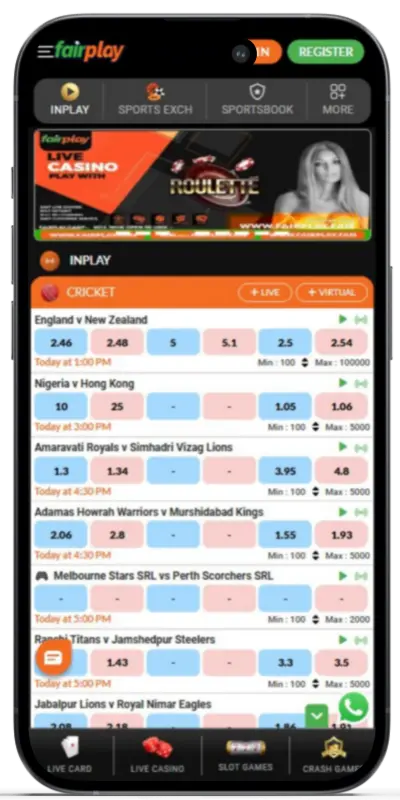
Cricket, football, kabaddi and other sports
Pre-match and in-play markets
Fairplay24 exchange selections
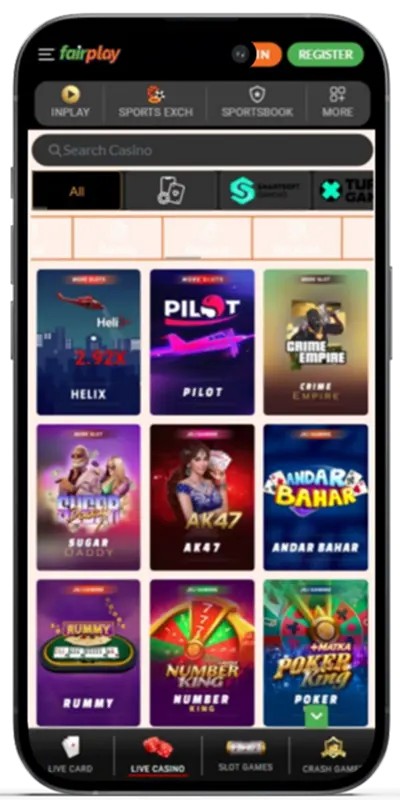
Slots and digital table games
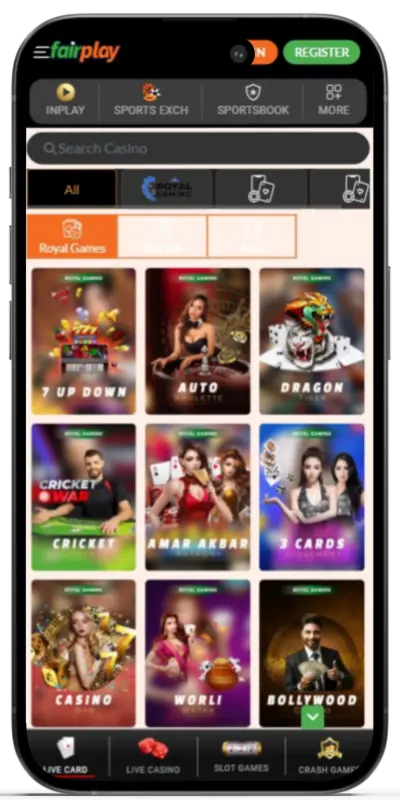
Live-dealer casino tables
Crash and instant-play games
Deposits and eligible withdrawals
Current promotions
Account and security settings
Customer-support options
The exact selection of markets, games, providers and payment methods can change. Users should review the latest information displayed inside their accounts before participating.
A Mobile Experience Designed Around Convenience
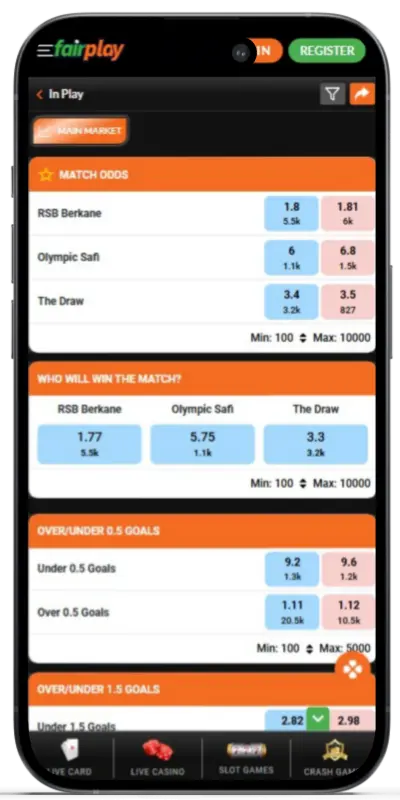
The mobile interface is arranged to make commonly used features easier to reach on a smartphone. Event pages, market lists, game categories, the bet slip and wallet tools are adapted for touchscreen navigation.
Users following a live cricket match may be able to check current prices, choose a market, enter a stake and review the final details from one device. Casino users can open supported titles from the game lobby without downloading a separate application for every game.
Mobile access may be useful for:
Checking current match schedules
Reviewing changing live prices
Following active selections
Managing account information
Viewing transaction history
Opening supported games
Contacting available support
Reviewing promotional conditions
Performance depends on the phone or tablet, operating-system version, available storage and network quality. Live streams and dealer tables generally require a more stable connection than standard account pages.
Fairplay24 App Specifications
The installation method can differ between operating systems. Android users may be offered an APK file, while iOS users may receive a Progressive Web App or home-screen installation option.
A PWA opens in an app-style window but continues loading most information through the internet. Users who prefer not to install either option can access the responsive Fairplay24.app website through a compatible mobile browser.
The following information reflects the specifications stated for the available versions. Requirements and file sizes can change, so always review the verified download page before installation.
Feature
Android
iOS
Installation format
APK
Progressive Web App
Approximate size
21–22 MB
Approximately 300 KB
Minimum operating system
Android 5.0 or later
iOS 12.0 or later
Available languages
English and Hindi
English and Hindi
INR account support
Available for eligible accounts
Available for eligible accounts
Installation fee
Free
Free
Internet required
Yes
Yes
Account access
Existing or new Fairplay24 ID
Existing or new Fairplay24 ID
Fairplay24 App vs Mobile Website
Regular mobile users may prefer a home-screen application because it can open more directly. Occasional users may find the mobile website more convenient because it does not require a separate installation.
Both options may provide access to the same Fairplay24 online ID. The better choice depends on the user’s device, available storage and frequency of access.
Feature
Fairplay24 App
Mobile Website
How it opens
From the home screen or app menu
Through a mobile browser
Installation
Required
Not required
Device storage
Uses application storage
Uses browser storage only
Best suited for
Regular mobile access
Occasional access
Notifications
May support selected alerts
Usually more limited
Biometric access
May be available
Depends on the browser and device
Updates
May require a new APK or PWA refresh
Website updates appear automatically
Account details
Uses the existing profile
Uses the existing profile
Internet connection
Required
Required
What Can You Access Through the Fairplay24 App?
The Fairplay24 App may connect available sports, exchange, casino, payment and profile services to one account. Users generally do not need separate wallets or passwords for each category.
A Fairplay24 betting ID may provide access to the following sections, subject to account status, location and current availability.
Sports and Exchange Markets
The sports area may feature cricket, football, tennis, kabaddi, basketball and other scheduled events. Some fixtures offer only pre-match markets, while selected matches may include live options after play begins.
Users can choose an available outcome, add it to the mobile bet slip, enter an INR stake and check the possible return before confirming. Certain events may also provide back-and-lay options through Fairplay24 exchange markets.
During a live event, users may be able to:
View updated match prices
Explore currently open in-play markets
Add or remove selections
Change stake amounts before confirmation
Review open and settled selections
Use cash-out when offered
Follow selected scores or event information
A live price may change between selection and confirmation. Markets can also be suspended after a wicket, goal, point, review or other important event. Always check the accepted price displayed on the final confirmation screen.
Cricket and IPL Access
Cricket is a major part of the mobile sports experience. Available events may include IPL fixtures, international tours, domestic competitions and selected T20 leagues.
Users accessing Fairplay24 cricket ID online features may find markets such as:
Match winner
Toss winner
Innings total
Top batter
Top bowler
Player performance
Powerplay runs
Session totals
Partnerships
Fours and sixes
Team or player milestones
Availability differs between matches. Every market may also have individual settlement rules, so the complete conditions should be reviewed before confirming a Fairplay24 bet.
Casino and Instant Games
The mobile casino area may bring slots, digital card games, table games, jackpots and short-format titles together in one lobby. Supported games normally open within the platform, removing the need to download a separate file for each title.
Available categories may include:
Slots and feature-based games
Roulette and blackjack
Baccarat and poker variations
Teen Patti and Andar Bahar
Dragon Tiger
Crash and multiplier games
Mines and Plinko-style games
Quick-result instant titles
Some providers may offer a demonstration mode. Demo play can help users understand a game’s controls, but it cannot predict future real-money results.
Each title can have different rules, stake limits, return information and promotional restrictions. Review the paytable or instructions before playing.
Live Casino Tables
Live casino games combine a real-time video stream with touchscreen betting controls. Users can view the dealer, review the table limits and manage available selections from the same screen.
A reliable connection is important because every round takes place in real time. Changing networks while a round is active may interrupt the stream.
Depending on provider availability, the live lobby may include:
European, speed or automatic roulette
Classic and speed blackjack
Standard or no-commission baccarat
Live Teen Patti
Live Andar Bahar
Dragon Tiger
Poker-based casino tables
Selected game-show formats
Every table has individual betting limits, round times and settlement rules. Users should understand these details before entering a stake.
Wallet, Deposits and Withdrawals
Eligible account holders may access the cashier from the mobile platform. Available balances, transaction records and supported payment services can be displayed in Indian rupees when INR is enabled.
Deposits may be credited quickly, but the exact time depends on the method, provider and account status. Withdrawal requests can take longer when identity verification, bonus conditions or additional account checks are required.
Available methods may include:
UPI
Paytm
PhonePe
Google Pay
Net banking
Bank transfer
Debit or credit cards
Selected cryptocurrencies
Not every method is available for every account. Before making a transaction, confirm the current limits, fees, processing period and withdrawal conditions shown inside the payment section.
Built for Eligible Indian Mobile Users
The Fairplay24 App may include features selected for users accessing the platform from India. Availability depends on the account and current platform setup.
INR Account Display
Supported deposits, available balances and eligible withdrawals may be displayed in Indian rupees, helping users understand transaction amounts without manually converting currencies.
Familiar Payment Options
UPI, bank transfers and selected mobile-wallet services may be displayed inside eligible accounts. Current options should always be confirmed before sending money.
Cricket-Focused Coverage
Users may find IPL matches, international fixtures, domestic tournaments and selected live cricket markets according to the daily schedule.
English and Hindi Access
Supported platform areas may be available in English and Hindi. Language coverage can differ between account pages, providers and games.
Mobile Alerts
Selected notifications may be available for account activity, important events, promotions or service information. Notification settings can normally be managed through the device or account preferences.
One Connected Profile
Sports, casino games, Fairplay24 exchange options, payments and security settings may remain linked to one account.
These conveniences do not remove the possibility of financial loss. Users should verify local rules, establish an affordable spending limit and participate only when they satisfy the applicable minimum-age and location requirements.
How to Download the Fairplay24 App on Android
Android users may install the platform through the verified Fairplay24 APK page. The listed file size is approximately 21–22 MB, and Android 5.0 or later may be required.
Compatibility can still depend on the phone manufacturer, available storage, security settings and current application version.
Do not download an APK from unofficial mirrors, social-media messages, unknown groups or third-party pages. Modified files can create unnecessary risks for account and payment information.
Android Installation Steps
Open the verified website: Visit the official Fairplay24 App download page using the browser on your Android device.
Locate the mobile section: Open the main menu and select the Android download option.
Download the APK: Allow the browser to save the official installation file.
Review the Android prompt: Your device may initially block files installed through a browser.
Allow the required permission: Temporarily permit installation from the browser you used.
Open the file: Find the APK in your browser’s download history or the Downloads folder.
Review the permissions: Check what the application is requesting before continuing.
Complete the installation: Follow the instructions displayed on the screen.
Launch the application: Open it from the home screen or app menu.
Sign in or register: Use the credentials connected to your Fairplay24 ID or create an eligible account.
After installation, turn off the browser’s permission to install unknown applications unless it is required for another trusted file.
How to Add the Fairplay24 App on iPhone or iPad
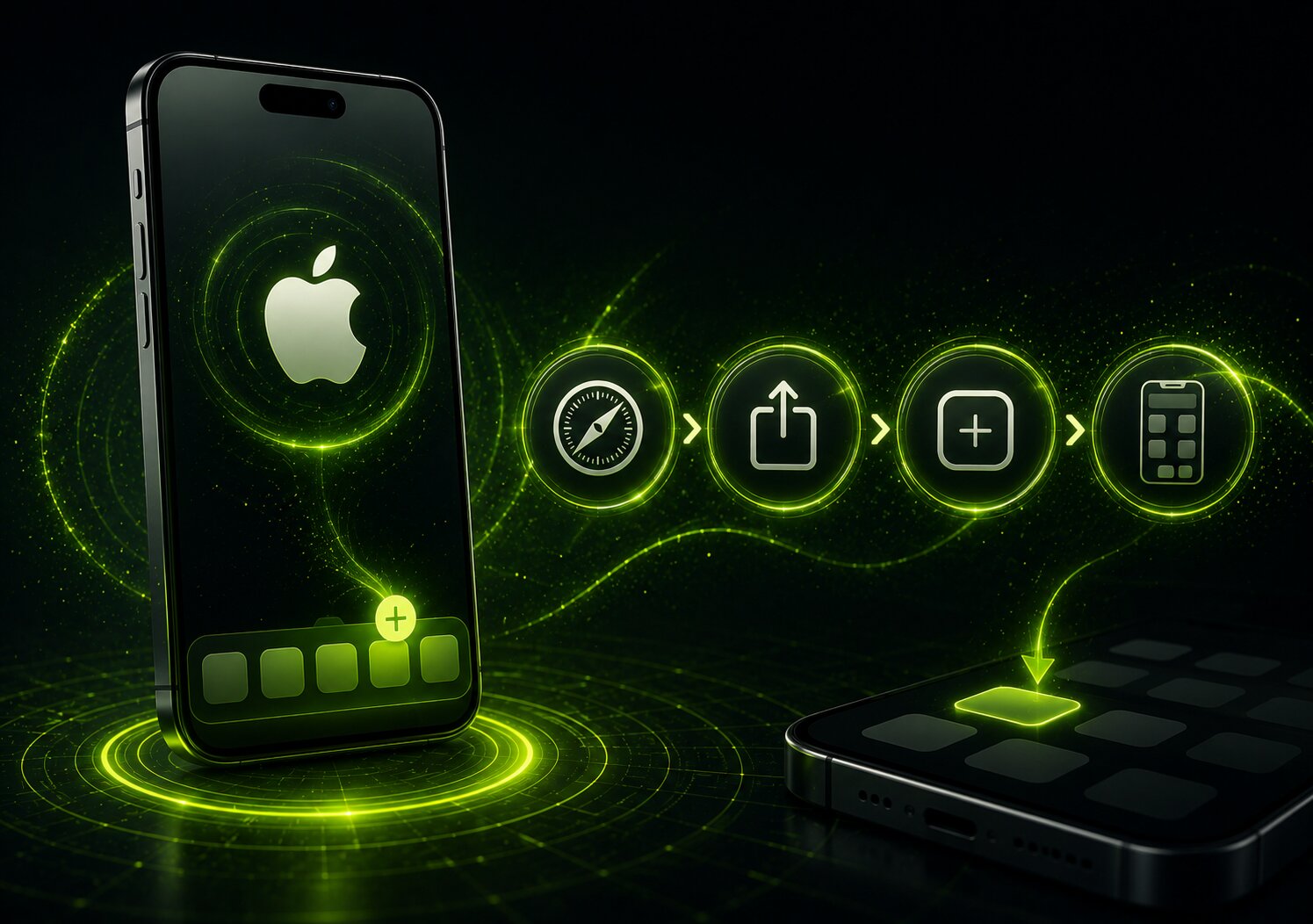
The iOS option may be provided as a Progressive Web App instead of a traditional App Store application. This creates a home-screen icon that launches the platform in an app-style window through Safari.
The stated PWA size is approximately 300 KB, and iOS 12.0 or later may be required. Most content is loaded online, so an active internet connection remains necessary.
iOS Installation Steps
Open Safari: Use Safari on the compatible iPhone or iPad.
Visit the verified page: Enter the correct Fairplay24.app address.
Find the mobile instructions: Open the application or iOS access section.
Tap the Share icon: Use Safari’s Share option when instructed.
Select Add to Home Screen: Review the displayed name and icon.
Confirm the shortcut: Tap Add to complete the process.
Launch the PWA: Open the new icon from the home screen.
The steps can vary slightly between iOS versions. Avoid unofficial configuration profiles or applications that imitate Fairplay24 com branding.
How to Register Through the Fairplay24 App
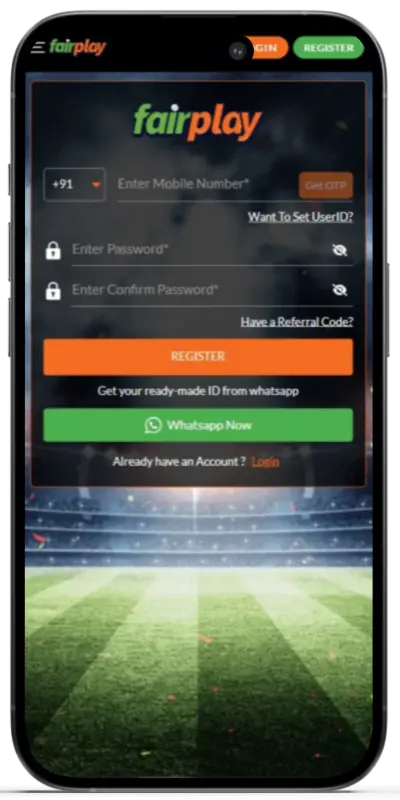
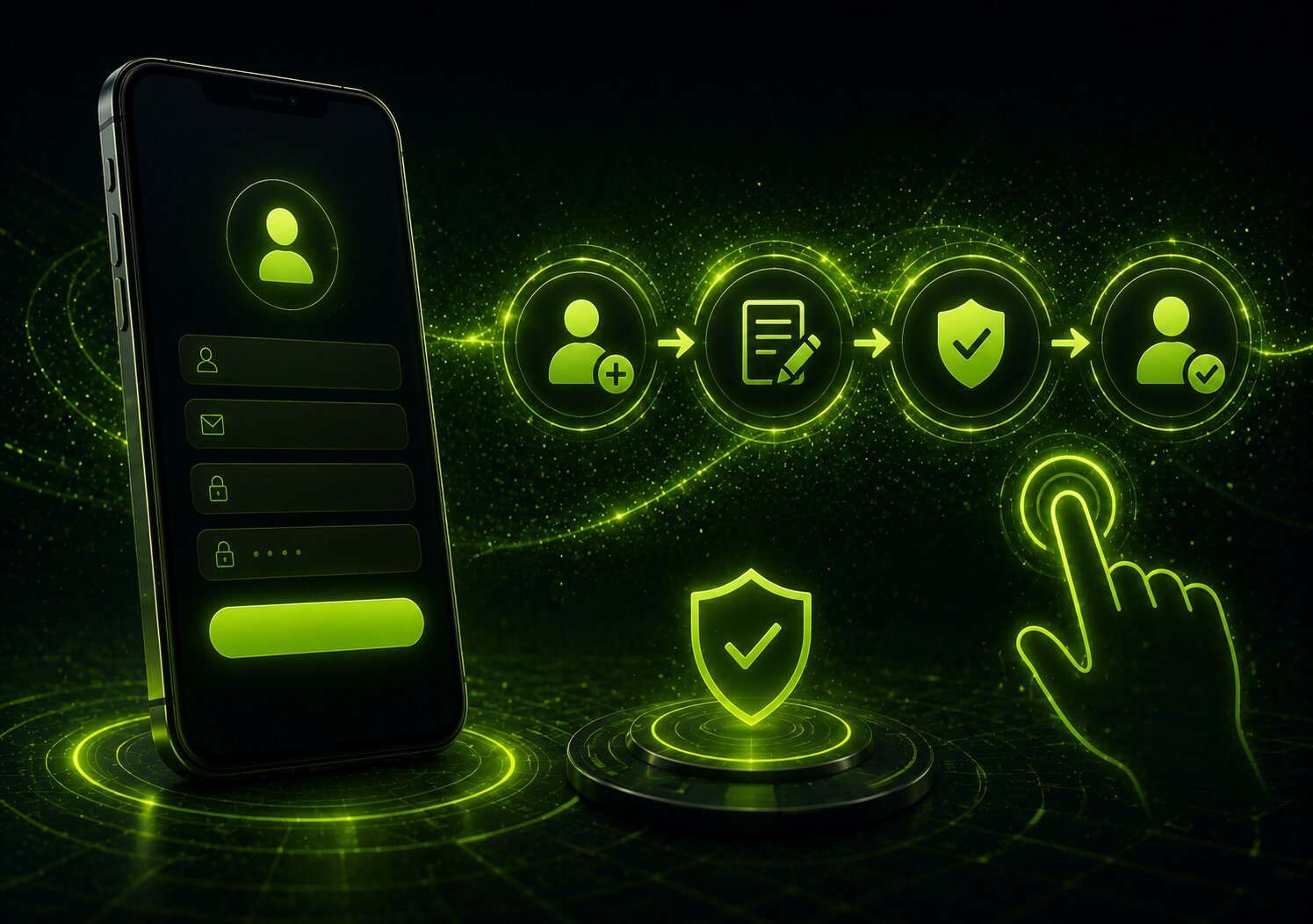
Eligible new users may be able to create an account directly through the mobile platform. The registration form can request an active mobile number, a preferred username, a strong password and other verification information.
Provide accurate details. Correct personal information can make OTP verification, password recovery, identity checks and withdrawal processing easier later.
Fairplay24 Registration Steps
Open the verified mobile platform.
Select Register, Sign Up or Create Account.
Enter an active mobile number.
Create a unique username if requested.
Set a strong and private password.
Enter the OTP sent to the registered number.
Review the Terms and Conditions.
Read the Privacy Policy and responsible-use information.
Confirm the registration request.
Complete any required identity checks.
Use the new details to complete the Fairplay24 login.
One account may be used for the sportsbook, exchange, casino, promotions, wallet and profile sections. Users should avoid opening duplicate accounts unless explicitly permitted under the current terms.
All Players can use their credentials to access their FairPlay App. Login can be one of following three ways:
Mobile number
It is confirmed by a password or OTP
User ID
It requires a password
Telegram
A registered messenger account is necessary
How to Complete the Fairplay24 Login
Returning users can access their account with the information provided during registration. Depending on availability, this may involve a mobile number, username, password or OTP.
Possible access methods include:
Mobile number: Enter the number linked to the account and provide a password or OTP when requested.
User ID: Use the username and password created during registration.
Additional linked access: Another verified login method may be offered where supported.
Biometric login: Fingerprint or Face ID may be available on compatible devices after the first successful login.
Two-factor authentication: An extra code may be requested for login or sensitive account actions.
Never share your password or OTP with friends, agents or unknown support contacts. If you forget your password, use the official recovery option instead of creating another Fairplay24 ID.
How to Update the Fairplay24 App
Using the latest verified version can help resolve loading problems, account-access errors, payment-page issues and device-compatibility difficulties. Updates may also introduce security improvements or redesigned features.
Never update through an unknown link. Modified or outdated files can place the device and Fairplay24 betting ID at risk.
Updating on Android
Android users may need to download the newest APK from the official page and install it over the current version.
Before starting:
Check that sufficient storage is available.
Confirm that the file comes from the verified website.
Keep access to the registered mobile number.
Close the existing application.
Avoid deleting the old version unless necessary.
Use a stable internet connection.
Installing the new version over the existing application should normally preserve account access. The user’s profile and balance are connected to the platform rather than stored only within the APK.
Updating on iOS
A PWA generally loads the latest online content automatically. If outdated information remains visible, users can:
Refresh the current page
Close and reopen the PWA
Clear relevant Safari website data
Remove the shortcut
Add the verified PWA to the home screen again
Do not install unknown profiles claiming to provide an exclusive iOS version.
Problems Caused by an Older Version
An outdated application may lead to:
Unsuccessful login attempts
Blank or incomplete pages
Missing account functions
Incorrect promotional information
Payment-page errors
Unexpected crashes
Poor device compatibility
Slow or failed game loading
The latest official version is generally the safest choice.
Reinstalling Without Losing Your Fairplay24 ID
Removing the application from a phone does not normally delete the account. The wallet balance, transaction history, eligible rewards and activity records are linked to the user profile on the platform.
After reinstalling, users can usually enter the same login details. An OTP or security check may be required, so continued access to the registered mobile number or email is important.
When Reinstallation May Be Useful
Consider reinstalling when:
The app closes immediately after opening
The original APK did not download completely
Pages remain blank after refreshing
Updated features are not displayed
The installation was interrupted
Clearing temporary files did not help
The home-screen shortcut no longer works
Before reinstalling, restart the device, confirm the internet connection, clear temporary files and check the available storage. Contact verified support if the issue continues.
Fairplay24 App Troubleshooting Guide
Many mobile issues are connected to installation permissions, network quality, outdated files, insufficient storage or account verification.
Problem
Recommended Action
APK does not install
Confirm available storage and temporarily allow installation from the browser used
App closes after opening
Restart the device, clear the cache or reinstall the official version
Fairplay24 login fails
Check the username, mobile number and password or use account recovery
OTP does not arrive
Verify the number, check the mobile signal and request a fresh code
Sports or games do not load
Switch to stable Wi-Fi or reliable mobile data
Old information appears
Refresh the page, clear temporary data or update the application
Deposit attempt fails
Recheck payment information and use another currently listed method
Withdrawal remains pending
Review KYC status, account details and the displayed processing period
Live video freezes
Close background apps and connect to a stronger network
Promotion does not appear
Check eligibility, activation steps and offer dates
iOS application is unavailable
Use the verified PWA installation method through Safari
Home-screen icon is missing
Search the app library or add the shortcut again
Account is temporarily restricted
Stop repeated login attempts and use verified support
Biometric login does not work
Sign in manually and review device or account security settings
Fairplay24 App Security Tips
Installing the correct application is important because imitation websites and modified APK files can expose personal, login or payment information.
Follow these practical safety measures:
Download files only from a verified Fairplay24.app page.
Check the complete website address before entering credentials.
Do not use APK files received through unknown messages.
Create a unique password for the account.
Enable two-factor authentication where available.
Keep the device operating system updated.
Never disclose an OTP.
Avoid using unsecured public Wi-Fi.
Log out before lending or selling the device.
Review account activity regularly.
Report unfamiliar transactions immediately.
Use only verified customer-support channels.
No genuine representative should need your complete password or full OTP to provide assistance.
Responsible Use of the Fairplay24 App
Mobile access makes the platform more convenient, but it may also make it easier to spend more time or money than intended. Users should decide their limits before opening the application.
Sports markets and online games should be treated only as paid entertainment. They must not be considered a dependable way to earn income.
Responsible-use practices include:
Set an affordable deposit limit.
Choose a maximum session duration.
Take scheduled breaks.
Never chase a previous loss.
Do not borrow money to participate.
Avoid using funds needed for essential expenses.
Do not play while stressed or under the influence.
Review transaction and participation history.
Turn off unnecessary promotional notifications.
Use temporary restrictions when needed.
Request self-exclusion if control becomes difficult.
Seek independent professional help when gaming affects finances, health or relationships.
Online gaming regulations differ between Indian states. Users must verify the rules applying to their location before creating a Fairplay24 online ID, depositing funds or participating.
Frequently Asked Questions About the Fairplay24 App
What is the Fairplay24 App?
The Fairplay24 App is a mobile-access option that may connect eligible users to sports markets, cricket events, exchange selections, online games, wallet tools and account settings through one profile.
Is the Fairplay24 App free to download?
The Android APK and iOS PWA can generally be installed without an application fee. Real-money participation requires an eligible account and available funds.
Can the Fairplay24 App be used in India?
The platform is designed to offer features relevant to Indian users, including INR display, cricket coverage and selected local payment methods. However, online gaming laws differ between states, so every user must confirm local eligibility.
Where should I download the latest version?
Use only the verified Fairplay24 App download page. Android users should obtain the current official APK, while iPhone and iPad users should follow the latest Safari PWA instructions.
Why is the APK not installing?
Android may initially block applications downloaded through a browser. Confirm that the file is complete, check available storage and allow installation from the browser used. Avoid turning off broader security protection unnecessarily.
Is the application available on Google Play?
The Android version may be distributed as an APK rather than through Google Play. Check the verified download page instead of trusting applications with similar names.
Is there a native iPhone application?
The iOS option may be offered as a Progressive Web App. Users can generally add it to the home screen through Safari without installing a traditional App Store application.
Can I use my existing Fairplay24 ID?
Yes. Existing users can normally sign in with the mobile number, user ID and password already connected to their accounts.
Do I need separate accounts for sports and casino games?
One Fairplay24 ID may connect eligible sports, exchange, casino, wallet and profile sections. Exact access depends on the account, location and current platform availability.
Can I access IPL markets through the app?
Selected IPL fixtures may offer pre-match or live markets, including match winner, innings totals, player performance and session options. Availability varies by event.
Does uninstalling the app remove my balance?
No. Removing the application should not delete the account or balance because the information remains linked to the Fairplay24 ID. Users can normally regain access after reinstalling.
Why does the Fairplay24 App keep crashing?
Possible causes include low storage, cached files, an outdated version, an incomplete installation or device incompatibility. Restart the phone, clear temporary files and install the latest verified version.
What should I do when my login fails?
Check the registered mobile number or username, enter the password carefully and confirm the internet connection. Use the official password-recovery option if required.
Why am I not receiving an OTP?
Confirm that the registered mobile number is active, check the network signal and wait briefly before requesting another code. Contact verified support if repeated requests fail.
Can I deposit and withdraw through the application?
Eligible users may access available payment services through the wallet or cashier. Methods, limits, verification requirements and processing times depend on the account and current platform rules.
Why can a withdrawal take longer than a deposit?
Withdrawals may require KYC checks, account reviews, promotional verification, payment-provider approval or banking processing. Review the current status and wait for the displayed processing period before contacting support.
Does the app support fingerprint or Face ID login?
Biometric access may be available on compatible devices. Users may need to complete an initial password login before enabling it through the security settings.
Can I use the same account on more than one device?
The same account may normally be accessed from compatible mobile and desktop devices. Additional OTP or identity confirmation may be requested when a new device is detected.
Does the app require a constant internet connection?
Yes. Account pages, live prices, games, streams and payment information are loaded online. A stable connection is particularly important during live events and dealer games.
How can I protect my Fairplay24 betting ID?
Use a unique password, keep verification codes private, install updates only from verified sources and avoid entering credentials on copied or unfamiliar websites.
What should I do if I notice unfamiliar account activity?
Change the password immediately, review recent transactions, log out of other devices where possible and contact verified customer support. Do not share an OTP with anyone claiming to investigate the issue.
Can I limit my spending or take a break?
Deposit limits, session reminders, temporary breaks and self-exclusion options may be available. Check the responsible-use area or contact support for the controls currently offered.
Is every game or sports market always available?
No. Availability can depend on the event schedule, provider, device, account status, location and platform conditions. Check the current lobby or sports area for accurate information.